Working from home is no longer a stopgap; for beaucoup de gens, it’s the new normal. Yet many “home offices” are still a laptop on the dining table, a chair that hurts after 30 minutes, and a pile of cables that threaten to strangle the vacuum cleaner.
If you want a space that really supports your work – focus, comfort, and yes, motivation – you need to treat it like a mini renovation project, pas comme un coin improvisé. Let’s walk through how to design a home office that’s both functional and genuinely inspiring, sans blabla décoratif inutile.
Start with what you actually do all day
Before choosing a pretty desk on Instagram, be brutally clear on your real needs. A graphic designer and a lawyer don’t work the same way, and their offices shouldn’t either.
Take 10 minutes and list:
- Your main tasks: calls, deep-focus writing, drawing, coding, video meetings, paperwork…
- Your tools: laptop only, 2 screens, printer, drawing tablet, physical files, samples, books…
- Time spent: 1–2 hours/day or full 8–10 hour days?
- Privacy needs: confidential calls? background noise ok or not?
- Shared space or solo: children, conjoint, colocataire using the same room?
This quick diagnosis will guide everything else: surface needed, level of storage, acoustic treatment, and your budget priorities.
Real-life example: Claire, freelance copywriter, thought she wanted a big desk and lots of shelves. After listing her real tasks (writing + video calls + reading), we prioritised a comfortable chair, good lighting, a second screen and a discreet backdrop. A compact 120 cm desk with a tall, narrow bookcase was enough. Total budget: about €900 all-in instead of the €2,500 she had in mind for “relooking the room”.
Choose the right spot (even in a small apartment)
Not everyone has a spare room, but almost everyone has some square metres that can be optimised. The idea is to choose a location that matches your work pattern, not just what “looks nice”.
Questions to ask yourself:
- When do I work? Early morning, daytime, late evening?
- Who is at home at those times? Children, partner, colocataires?
- Do I need a door that closes, or is a quiet corner enough?
Options to consider:
- Dedicated room: ideal if you have confidential calls or a lot of equipment. Plan at least 6–8 m² for a comfortable setup.
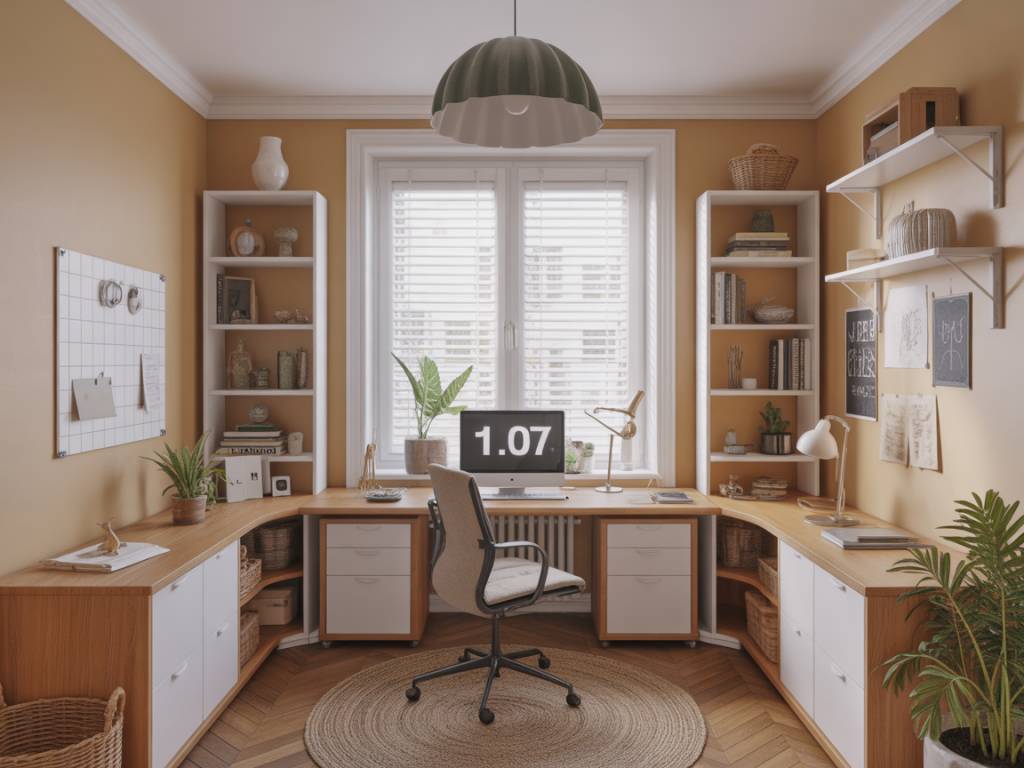
- Office in the living room: workable if you define a clear zone: backing the desk against a wall or window, or using a low shelf as a visual separator.
- Office in the bedroom: useful if you need isolation, but separate “sleep” and “work” areas: use a rug, a screen, or a change of wall colour.
- Circulation areas: hallways, under-stair spaces, niches. Perfect for compact wall-mounted desks if you mostly do laptop work.
Minimum dimensions to keep in mind:
- Desk: 120 cm wide x 60–70 cm deep for a standard computer setup.
- Clear knee space: 60 cm wide x 70 cm high minimum.
- Chair movement: ideally 80–90 cm clearance behind the chair.
Do a quick layout sketch with a pencil, or use a basic online planner. You’re looking for a position that allows you to sit facing a wall or window, not with your back to a busy circulation area.
Get ergonomics right first, aesthetics second
An inspiring office is one where your body doesn’t hurt after two hours. Start with the three essentials: desk, chair, and screen setup.
The desk
- Standard height: around 72–75 cm. If you’re short or tall, consider an adjustable desk or adjustable chair with footrest.
- Depth: 60 cm is a minimum; 70–80 cm is more comfortable if you have a screen + laptop.
- Surface finish: matte (no reflections), easy to clean. Avoid ultra-glossy tops that reflect the screen light.
- Sit-stand option: interesting if you work long hours. Budget: from €250–€300 for basic electric models to €700+ for high-end.
The chair
Do not reuse your dining chair if you work more than 3 hours/day. Your back will send you the bill.
- Essential features: adjustable height, lumbar support, tilting or rocking mechanism, and armrests that can slide under the desk.
- Budget ranges (for serious use):
- €150–€300: decent ergonomic chairs for 4–6 hours/day.
- €300–€800: pro-level chairs for 8+ hours/day (Herman Miller, Steelcase, etc. often available second-hand).
The screen(s)
- Top of the screen at (or slightly below) eye level when you sit straight.
- Distance: roughly an arm’s length from your eyes.
- If you work on a laptop: invest €20–€40 in a laptop stand + external keyboard/mouse.
Adjust everything, then test: 30 minutes of work. Any pain = something is too high, too low, or too far.
Plan storage so the chaos never reaches the desk
Paperwork, cables, chargers, samples… they will accumulate. The goal isn’t a Pinterest-perfect desk at all times; it’s to give every item a defined “home” so you can clear surfaces in 2 minutes.
Think in 3 zones:
- Zone A – On the desk: only what you use daily: laptop, screen, notepad, 1 pen pot, maybe a small plant.
- Zone B – Within arm’s reach: drawers, desktop organisers, wall shelves above the desk.
- Zone C – A bit further: cupboards, a taller cabinet, archive boxes for monthly/annual storage.
Storage solutions that work well in home offices:
- Under-desk drawer units on wheels (for stationery, active files, tech accessories).
- Wall-mounted cabinets above the desk (use the full height of the wall; 35–40 cm depth is plenty).
- Vertical file holders to free desk space but keep documents accessible.
- Cable organisers: cable trays under the desk, Velcro straps, multi-plugs fixed to the underside of the top.
Budget markers:
- Basic under-desk unit: €60–€150.
- Wall shelves (DIY plank + brackets): €20–€60 per metre.
- Closed cabinets (Ikea, etc.): €80–€200 per module.
If you’re in a small space, prioritise closed storage: visual calm will matter more than showing off your stationery collection.
Light that wakes you up, not your migraines
Lighting is one of the main factors that influence your energy, concentration, and eye fatigue. Treat it like a mini lighting design project.
Natural light
- Position the desk perpendicular to the window if possible (light from the side), to avoid glare on the screen.
- Left-handed: window on the right; right-handed: window on the left (to avoid casting your own shadow on what you write).
- Use light, non-shiny curtains to diffuse direct sun if necessary.
Artificial light
- General light: a ceiling light or floor lamp, warm neutral (2700–3000K) or neutral (3000–3500K).
- Desk lamp: adjustable arm, wide head, neutral white (3000–4000K), no visible bulb in your field of view.
- Accent light: small wall light or LED strip on a shelf for ambiance in late hours.
For video calls, watch your face lighting: avoid the “horror movie” backlit effect. Have a soft light source in front of you or slightly to the side. A simple desk lamp with a matte white shade often does the job.
Acoustics and privacy: stop working in a train station
Noise is one of the top complaints in home offices, especially with children or neighbours nearby. You’ll rarely get perfect silence, but you can control the sound environment.
Easy acoustic improvements:
- Rug under the desk (absorbs sound and makes the space visually “anchored”).
- Heavy curtains (especially if you’re near a window on a street).
- Bookshelves and filled cabinets along the walls (excellent sound absorbers/diffusers).
- A few acoustic panels placed opposite each other if you have lots of hard surfaces (budget: €40–€100 per panel; DIY possible with fabric + insulation).
For calls and online meetings:
- Invest in a decent headset with microphone: game changer for sound quality. From €60–€200 for a good model.
- Define clear rules with the household for “do not disturb” times; a simple sign on the door during meetings can be surprisingly effective.
- If you’re in an open space, consider a folding screen behind your chair: it filters visual distractions and improves sound a bit.
Make tech invisible (or almost)
Nothing kills inspiration faster than a nest of cables and blinking chargers everywhere. You don’t need a server room; just a bit of planning.
Before buying furniture, check:
- Power outlets: how many are near your future desk?
- Network: Wi-Fi stable or do you need an Ethernet cable?
- Printer/scanner: in the same room or elsewhere?
Practical solutions:
- Install a multi-plug with surge protection fixed under the desk.
- Use cable trays screwed under the top to hold transformers and excess lengths.
- Choose a desk with an integrated cable pass-through, or drill one (with a 60 mm hole saw, €10–€15).
- Group small accessories (chargers, adapters, USB keys) in a single labelled box or drawer divider.
If you often switch between laptop and tablet/phone, think about a small docking station or a vertical stand: less clutter, fewer cables on the surface.
Colours and materials that actually help you focus
Forget the idea that you must paint everything white to “feel calm”, or everything dark to look “serious”. The goal is to create a visual environment that supports your way of working.
Safe, efficient base:
- Walls: off-white, light greige, or very light sage/blue-grey.
- Desk: wood or wood-effect matte, or a muted solid colour (e.g. warm grey, sand, olive).
- Floor: avoid strong contrasts (black and white) that tire the eye; if you can add a rug, choose a simple pattern or plain colour.
Add colour strategically:
- Paint one wall (ideally the one you face) in a deeper but not aggressive tone: ink blue, terracotta, forest green.
- Use textiles (rug, curtains, chair cushion) for a bit of warmth and texture.
- Limit strong patterns to small surfaces (a poster, a notebook) so they don’t distract you.
Materials to favour:
- Matte finishes (for walls, furniture) to avoid reflections.
- Warm materials near touch points: wood, cork, fabric.
- A few plants (real ones) for visual rest and better air quality if the room is ventilated.
Ask yourself: “Could I stare at this wall for 3 hours during a deadline without getting a headache?” If the answer is no, tone it down.
Style it with intention, not clutter
Inspiration doesn’t come from filling the room with decorative objects; it comes from a few elements that resonate with your goals and your personality. Think “curated”, not “crowded”.
3–5 items that can make all the difference:
- 1 or 2 frames (posters, photos, drawings) that energise you, placed in your field of vision but not directly above the screen.
- 1 plant that you’ll actually keep alive (pothos, sansevieria, zamioculcas… resistant and tolerant to low light).
- 1 beautiful, comfortable pen + notebook set that makes you want to write or sketchnote.
- 1 board (magnetic, cork, pegboard) reserved for your projects or your current week’s plan.
- 1 small ritual object: candle, diffuser, hourglass, anything that marks “work mode” when you sit down.
Avoid accumulating small decorative items on the desk; reserve them for shelves or a secondary surface. Visual noise = mental noise.
Budgets and timelines: what to expect
To give you an idea, here are three typical investment levels for a home office, excluding structural renovations.
Minimal, efficient setup – from around €400–€700
- Simple desk (120 x 60): €80–€200
- Ergonomic chair (entry level): €150–€250
- Desk lamp: €30–€80
- Basic storage (shelf + small drawer unit): €80–€150
- Accessories (cable management, organiser, plant): €60–€120
Comfort + aesthetics – from around €900–€1,800
- Higher quality or sit-stand desk: €250–€700
- Ergonomic chair mid/high range (possibly second-hand pro): €250–€600
- Lighting (ceiling + desk lamp + ambiance): €100–€250
- Paint and minor decor: €100–€200
- Storage furniture: €200–€400
- Tech accessories (stand, headset, docking station): €100–€250
Integrated, custom office – from around €2,000–€5,000+
- Made-to-measure joinery (desk + full-height storage): €1,500–€3,500 depending on materials and complexity.
- Mid/high-range chair and lighting: €600–€1,200
- Possible electrical upgrades (extra outlets, data): €200–€600
- Decoration, accessories and textiles: €300–€700
Timeframe:
- Simple setup with off-the-shelf furniture: 1 weekend of shopping + 1 day of assembly and installation.
- Paint + furniture + small electrical adjustments: 2–3 weekends.
- Custom-made joinery: 4–8 weeks of lead time + 1–3 days of installation.
Common mistakes to avoid
After years on renovation sites and dozens of home office projects, I see the same errors again and again. Avoid them, and you’re already ahead.
- Choosing the desk for its look, not its dimensions. Check depth and leg space before falling for a design desk.
- Ignoring acoustics. Hard floors + bare walls + empty room = echo chamber. Rug and textiles are not “nice to have”; they’re functional.
- Overloading the space with decor. An inspiring office is not a concept store. Leave negative space.
- Underestimating cable management. If you don’t plan it, you’ll hate the result in two weeks.
- Not testing the setup. Once everything is in place, work there for a few days, then adjust heights, distances, lighting before fixing anything permanently.
Your action plan in 7 steps
If you want to move from “I should redo my office one day” to a concrete project, follow this sequence.
- Step 1 – Define your needs. Tasks, tools, schedule, privacy. Write them down.
- Step 2 – Choose your spot. Measure the available space, sketch a layout, check outlets and light.
- Step 3 – Fix your budget. Decide on a range and where you’re ready to invest (chair? lighting? storage?).
- Step 4 – Select the essentials. Desk, chair, lighting, basic storage. Prioritise ergonomics.
- Step 5 – Organise tech and cables. Multi-plugs, tray, stand, docking station if needed.
- Step 6 – Work on colours and materials. One coherent palette, some texture, no aggressive patterns right in front of your nose.
- Step 7 – Add your inspiration layer. 3–5 carefully chosen elements that really motivate you, not generic “office decor”.
Designing a home office that truly supports your work is less about buying the “perfect” desk and more about asking the right questions, in the right order. If you treat this as a small, structured project – with measurements, a budget, and a clear plan – you’ll end up with a space where you actually want to sit down and get things done.